Using CNC in segmented bowl turning

GrahamJ46

PRO Member
I haven't been active recently in segmented bowl turning. About 2 months ago a I bought a desktop CNC and have been spending time getting up to speed with that. I would like to incorporate my CNC into other aspects of my hobby and that includes segmented bowl turning. I am wondering if anyone has done that and what they have done.
 
The woodclub I belong to has two CNC machines. Just started to use the CNC to cut segments for 90 segments per ring. First test ring came out great. The CNC machines the club has also has a lathe attachment for cutting on round objects. I might later try it to engrave some patterns on a bowl.

I think the accuracy of the CNC will be a plus when it comes to higher count segment per ring.
 
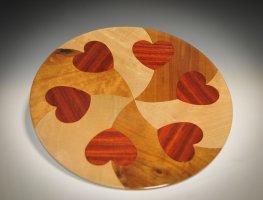
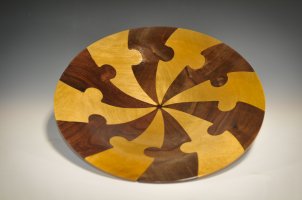
I have used my CNC machine to cut the pieces for two different platters. I have also used the CNC to build feature rings. I will see if I can find some pictures of those. Just a lot of fun to learn how to do more with the wood and machines that I have.
 

Attachments

  • Wood 21-108.jpg
    Wood 21-108.jpg
    3 MB · Views: 21
  • Wood 21-111.jpg
    Wood 21-111.jpg
    2.4 MB · Views: 23
I have used my CNC machine to cut the pieces for two different platters. I have also used the CNC to build feature rings. I will see if I can find some pictures of those. Just a lot of fun to learn how to do more with the wood and machines that I have.
That is really cool looking I just purchased my first cnc machine and I want to do things like that on my cnc and incorporate it with my segmented wood turnings if you could tell me how you did that on your router that would be great thanks
 
First, you draw a circle and divide the circle with the number you choose, draw an arc and then put some type of design into the arc. You use one of the arc pieces and cut that into some three quarter flat lumber. All the pieces should snap together, and if they do, then cut one half from two different colors of wood, glue the pieces together and turn on the lathe.
 
I haven't been active recently in segmented bowl turning. About 2 months ago a I bought a desktop CNC and have been spending time getting up to speed with that. I would like to incorporate my CNC into other aspects of my hobby and that includes segmented bowl turning. I am wondering if anyone has done that and what they have done.
Hi
i have been using my CNC to cut out the segments. It has been very successful in doing this accurately. The only downside to doing this is there is more wood waste as you will need 3 times the width of your endmill in between each segment which at a minimum would be 3/8 of an inck. To me the accuracy is worth it.
 
I haven't been active recently in segmented bowl turning. About 2 months ago a I bought a desktop CNC and have been spending time getting up to speed with that. I would like to incorporate my CNC into other aspects of my hobby and that includes segmented bowl turning. I am wondering if anyone has done that and what they have done.
I use my CNC a lot in my bowls. Vcarve logos in the bottom of bowls, Cut designs in segments most of the way through then fill with Epoxy, delight feature rings, etc.
 

Attachments

  •     1.jpg
    1.jpg
    434 KB · Views: 23
I have tried cnc machine for segments but have found that my laser works far better. I typically make open and closed segment bowls with anywhere from16 to 48 segments per row and up to 3000 segments in the bowl. The segments are anywhere from 1/8 to 1/4" thick. I have a 70 watt laser but have used a 40 watt laser also. You will find you save a lot of material, sanding, and cutting slats by using a laser. The time savings is big. If interested I can also supply my method for very quickly creating the laser files for lightburn. cdmaxim46@gmail.com
 
I have tried cnc machine for segments but have found that my laser works far better. I typically make open and closed segment bowls with anywhere from16 to 48 segments per row and up to 3000 segments in the bowl. The segments are anywhere from 1/8 to 1/4" thick. I have a 70 watt laser but have used a 40 watt laser also. You will find you save a lot of material, sanding, and cutting slats by using a laser. The time savings is big. If interested I can also supply my method for very quickly creating the laser files for lightburn. cdmaxim46@gmail.com
I will have to try this, can you provide some details like depth? Is there a problem with the burnt sides of the cut or does that disappear?
 
I normally use .220 or .250 for a thickness of the wood for cutting out the segments with a laser. The wood slats just need to be a little larger than the segment. I use vcarve and simply draw radial lines for the segment angle, asmall circle = to the row rarius-.03 and a large circle = small circle rarius + board width + .03. I then trim and array the number of segments I want to do at a time, typ 16.The burnt edges don't show on the closed segment after turning and on the open I think it looks better with the black edge. When you get into the higher segment count per row like 36 or 48 there isn't much gap. saves a lot of sanding and reduces sharp edges. Once you try it you never go back unless you are doing thick rows( like .75").
 
I normally use .220 or .250 for a thickness of the wood for cutting out the segments with a laser. The wood slats just need to be a little larger than the segment. I use vcarve and simply draw radial lines for the segment angle, asmall circle = to the row rarius-.03 and a large circle = small circle rarius + board width + .03. I then trim and array the number of segments I want to do at a time, typ 16.The burnt edges don't show on the closed segment after turning and on the open I think it looks better with the black edge. When you get into the higher segment count per row like 36 or 48 there isn't much gap. saves a lot of sanding and reduces sharp edges. Once you try it you never go back unless you are doing thick rows( like .75").

I also use vcarve pro to make my svg file for the laser.
Using the summary sheet I:
- create the OD and ID circle.
- create a vertical line from the center of the circle to just outside the OD circle.
- using the vector trim (scissor) tool trim away everything around 1 segment.
- highlight the remaining segment and use the Array Copy tool. Set the number of columns / rows so the total equals the number of segments needed for the ring.
- export the segment array as a svg and import into xtool for the laser to cut out the segmetns.
- imo, the advantage of doing this using the circles is when you glue up the segments you have a circle with the curved ID and OD of the segment.

1753241716531.png
 
That is exactly how I do it. If you have access to a laser you will never use any type of saw again to cut out segments.
 
Take some of the wood you plan on using to try out before you cut a lot of slats. Purpleheart, walnut, and padauk are the woods to try as they are somewhat difficult and will need more power or slower speed.. Plane some dwn to .22 and try some diferent settings on the laser. Purpleheart is the worst I've found since it has a lot of oil in it and inconsistent hardness. I try not to use a lot of PH for that reason. Bake it first to stabilize the color. I found it difficult to work with when I used s saw to cut the segments because of the chipouts and rough edges even though I was using a thin expensive saw blade. Anyway good luck. I think once you set up you will find it much easier and quicker to make the segments.
 
Back
Top